Have you ever gone through a daunting, repetitive task like opening support tickets? I have. And for a long time, I had to draft every single case manually using Notepad. To be honest, it drove me nuts. I’ve always believed in “working smart,” so I’m constantly looking for ways to simplify my life-and this project was the perfect start.
The Problem: The “Notepad” Bottleneck
I used to work as a Call Center agent for an IT company using IBM Maximo as our ticketing system. The workflow back then was quite manual: copy details from an old case, paste them into Notepad, and edit the details one by one.
Since most cases were repetitive, we had fixed templates. One common task involved coordinating with government officials. For instance, when a customer requested logs from the Authorities, the ticket had to be formatted exactly like this:
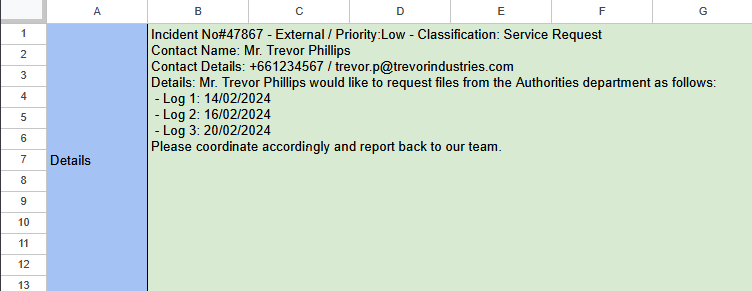
Incident No#47867 – External / Priority: Low – Classification: Service Request
Contact Name: Mr. Trevor Phillips
Contact Details: +661234567 / [email protected] Details: Mr. Trevor Phillips would like to request files from the Authorities department as follows:
- Log 1: 14/02/2024
- Log 2: 16/02/2024
- Log 3: 20/02/2024
Please coordinate accordingly and report back to our team.
(I can’t disclose the actual case details, but you get the point! And if you know who Trevor Phillips is, you’ll understand why I’d rather not get on his bad side by leaking his “actual” data)
Imagine doing this 10–20 times a day with at least 10 logs for each ticket with different date, changing every single detail by hand. It was clear to me that we couldn’t-and shouldn’t-do this forever.
The Solution: Bridging the Gap with Excel Logic
I decided to take matters into my own hands. I self-taught myself Advanced Microsoft Excel through YouTube, mastering functions like VLOOKUP, IF, and IFS. I then applied that knowledge to create a dynamic template.
Instead of manual editing, I engineered an input-output system where we just fill in the variables, and the template generates the final text automatically. It reduced hassle, minimized human error, and saved a ton of time. To this day, even after I’ve moved on to a new team, they are still using my templates. That makes me incredibly proud.
The Interactive Demo
I’ve recreated the logic in Google Sheets for this blog so you can see how it works in real-time. The concept is identical to the Excel version I built for the team. The screenshots are shown below.
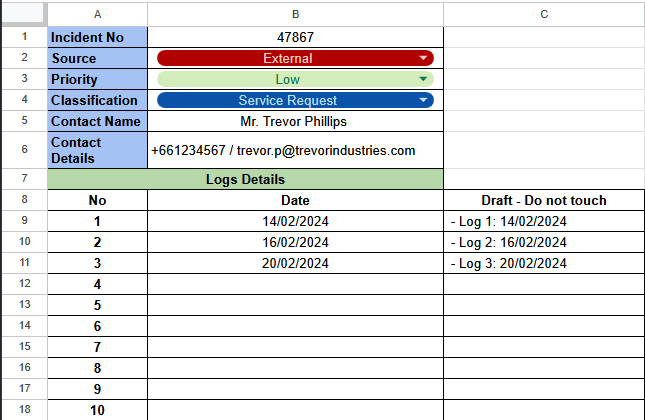
Link to the template: https://docs.google.com/spreadsheets/d/1Y4usljJX_2STubfOGpsjCIiJJNhufSCt4NSwflVpoi8/edit?usp=sharing. Feel free to duplicate my Google Sheet file and edit as your own.
Final Thoughts: Everyone Starts Somewhere
Building this tool was more than just a shortcut; it was a foundational learning process for me. It taught me the logic behind the process-a core skill for my dream of becoming a System Analyst or a Programmer.
You don’t need to be a Senior Engineer to build something useful. You can start with something as simple as Excel. Everyone starts simple.
What about you? Have you ever built a tool to solve a problem in your daily life? I’d love to hear your stories in the comments!